Service Area vs Physical Location: Which Google Business Profile Ranks Better?
If your Google Business Profile is set as a service area business, you're probably leaving rankings on the table. Here's the difference, the data behind why physical addresses win, and how to switch without losing your reviews.

Table of contents
- What’s the difference between the two?
- Why this matters more than almost anything else on your profile
- A real example: Coatney Fence’s two profiles, five miles apart
- A second example: a tree care company in Carnation, WA
- Why Google probably favors physical addresses
- ”But I work out of my house. Can I really list that?”
- How to actually switch your profile
- When you should not switch
- What to do this week
- FAQs
If you’re a home service contractor and your Google Business Profile is set as a service area business, there’s a real chance Google is quietly burying you in the map pack. Not because your work is bad. Not because your reviews are weak. Just because of one setting you probably haven’t touched since you set the profile up.
We’ve worked with over 50 contractors at this point across pest control, tree care, fence builders, roofers, electricians, and plumbers, and the pattern keeps showing up. Two businesses in the same town with similar reviews can rank 50 positions apart, and the only difference is whether one has a physical address listed and the other doesn’t. Google clearly favors location-based profiles, and once you see the data it’s hard to unsee.
Here’s what’s actually going on, two real before-and-after scans that prove it, and exactly how to flip your profile without losing your reviews or your verification.
What’s the difference between the two?
When you first create a Google Business Profile, Google asks you one question that decides everything that follows: Do you serve customers at your business address, or do you go to them? That choice splits every profile into one of two camps.
A service area business lists the cities or regions you cover but hides the physical address. When a homeowner looks you up, they see a wide map with no pin, just a shaded region showing where you work. Pest control operators, mobile groomers, plumbers, fence builders, and most home service contractors default to this option because they don’t run a storefront customers visit.
A location-based business lists a specific street address. The profile shows a blue pin on Google Maps right where you operate from. Customers can pull up directions. The whole thing reads like a brick-and-mortar even if you mostly drive to the job site.
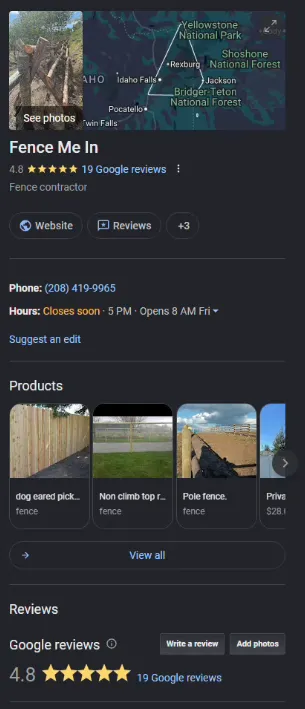
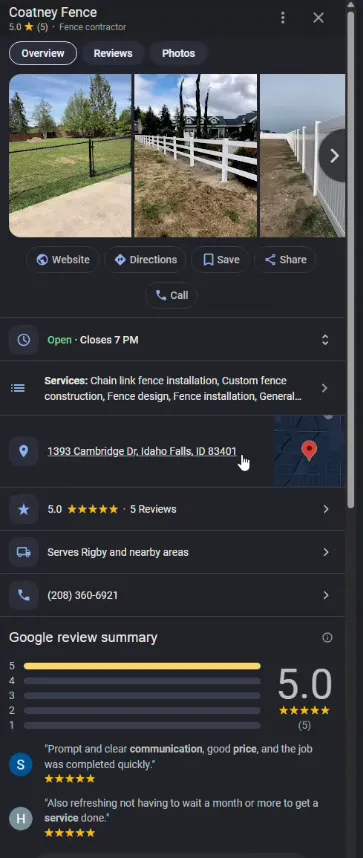
The fastest way to tell which type your profile is right now: Google your business name and look at the knowledge panel that pops up on the right.
If you see a real street address and a map with a pin, you’re location-based. If the map shows a shaded region with no address and no pin, you’re a service area business.
Why this matters more than almost anything else on your profile
Here’s the part nobody talks about. Google ranks location-based profiles dramatically higher than service area profiles in the map pack, even when everything else is identical. It’s not in their official documentation. They’ve never come out and said it. But every Local Falcon scan we run on contractor accounts shows the same pattern.
For context: Local Falcon is a tool that runs your business name against a target keyword across a grid of locations and shows where you rank at every point on the grid. A 13x13 grid scan tests 169 different physical search points around your service area.
Green dots mean you’re in the top three. Yellow means top ten. Red means buried. It’s the closest thing to an X-ray of your local SEO health.
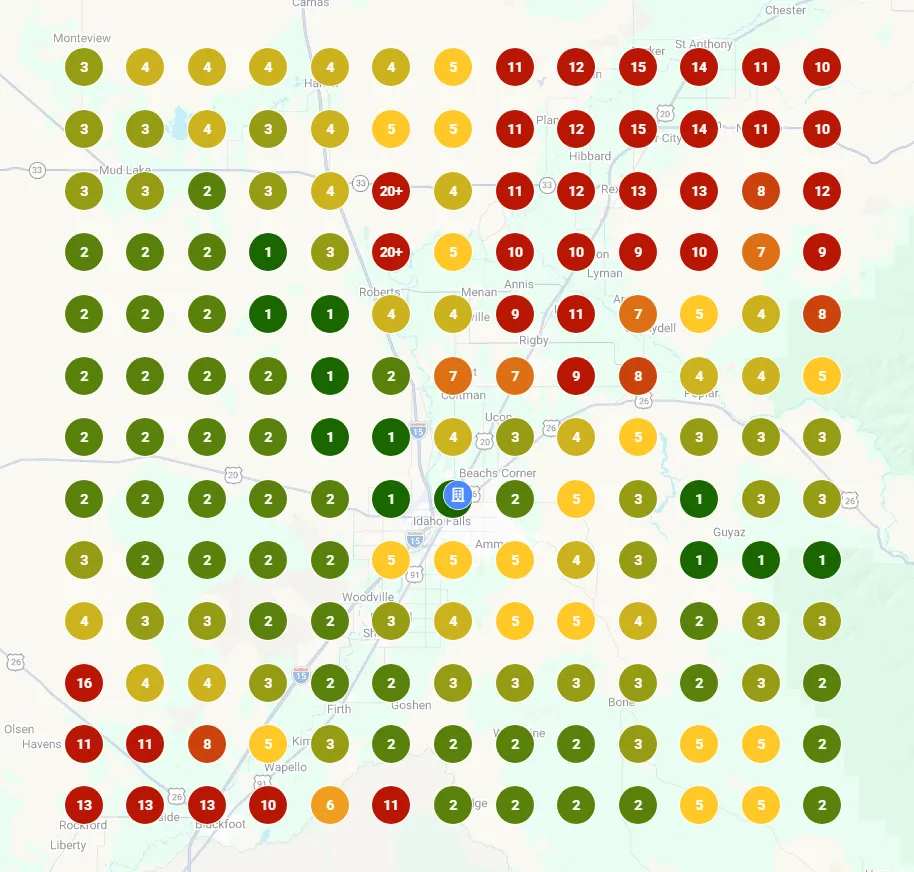
When we pull these scans for service area businesses, we see a familiar shape: a small cluster of decent rankings near wherever the business owner happens to live, and red dots everywhere else.
The profile has no anchor for Google to attach to. With a wide service area, the algorithm doesn’t know where to place you, and when in doubt it ranks you nowhere.
When we pull the same scans for location-based businesses with similar reviews, the green spreads out. There’s a clear “ranking bubble” centered on the physical address, and the further you get from it, the more the rankings taper. But the contractor is actually showing up, instead of sitting at position 50 across the whole grid.
A real example: Coatney Fence’s two profiles, five miles apart
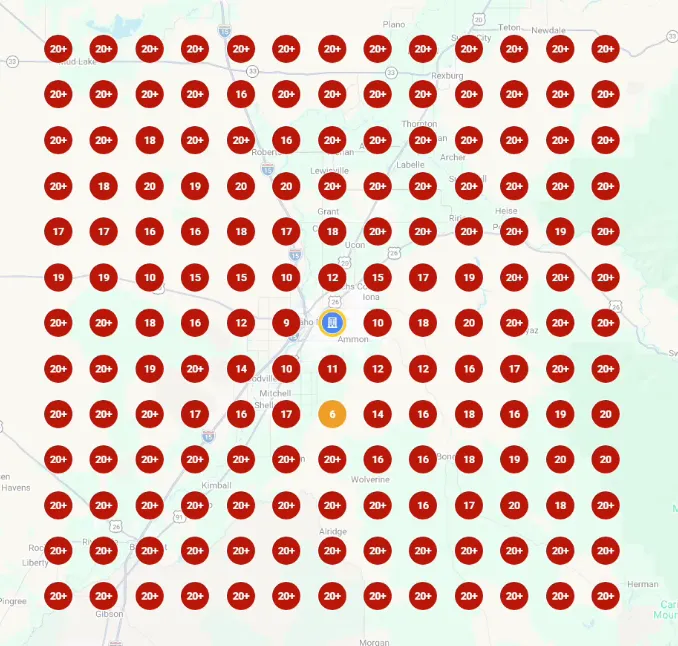
Coatney Fence, a fence contractor in the Idaho Falls area, had two separate Google Business Profiles about five miles apart. One in Idaho Falls, one in Rigby. Same trade. Same crew.
The Idaho Falls profile had 55 Google reviews and was set up as a service area business. The Rigby profile had 5 reviews and was set up as a location-based business with a physical address.
You’d expect the 55-review profile to crush the 5-review profile. Eleven times the social proof. Same market. Same parent company. Google should pick the one with more trust signals, right?
It didn’t.
The Rigby profile, with five reviews, was ranking 31st for “fence company near me” across the grid. Not great, but inside the top 50. Close to the physical address, they were even cracking the top ten.
The Idaho Falls profile, with 55 reviews, was ranking 53rd. Worse than the profile with one-tenth the reviews.
Why? Because when Google looked at the service area version, it had no idea where to actually place the business. It guessed. The guess was wrong. And the rankings collapsed around a random point that wasn’t even close to where the business owner lived.

That morning we got on a call with the owner. Walked her through changing the Idaho Falls profile from service area to location-based on the spot. By the time we hung up, Google had switched the setting and pinned the business to its real address. The reviews stayed intact. The verification stayed intact. The whole change took less than five minutes.
A second example: a tree care company in Carnation, WA
Here’s the one that turned us into hardcore believers in this approach.
We started working with a tree care company in Carnation, Washington, one of the most competitive tree care markets in the state, with over a hundred companies fighting for the same phone calls. When we ran the first scan for “tree service near me,” they were ranking 201st across the grid. Not in the top 200 anywhere. Completely buried.
They had 34 reviews at the time. More than a lot of their direct competitors. But the profile was set as a service area business and Google had no idea where they actually operated from.
The first move we made wasn’t building backlinks. It wasn’t optimizing the website. It wasn’t running ads. It was changing one setting: we switched the profile to a physical address using the owner’s home, because that’s where the business is registered with the state.
One month later, we ran the exact same scan. Same keyword. Same grid. Same business. They went from 201 to position 3 across the densest, most competitive blocks of their service area. They had picked up about 20 new reviews in that month, but the review count alone wasn’t doing this. The address change was.
We dug into this comparison in detail on our free Google audit page, where you can see both before-and-after grid scans side by side. The contrast between a sea of red dots and a sea of dark green is what convinced us this isn’t a fluke.
Why Google probably favors physical addresses
Google has never confirmed why this gap exists, so what follows is informed guessing. But after watching enough scans across enough industries, the most plausible explanation comes down to one word: certainty.
When Google ranks local businesses, it has to decide which three companies to show in the map pack for every individual search. A homeowner in your service area pulls out their phone and types “plumber near me.” Google needs to pick three to show, and there are only three slots.
If your business has a 50-mile service area declared but no real address, Google can’t confidently say you’re closer to that homeowner than the next plumber. The next plumber has a physical address two miles away. The next plumber wins, every time.
A location-based profile gives Google a fixed point on a map. It can calculate distance. It can score relevance. It can confidently say this business is 1.4 miles from this searcher, the other one is 4.7 miles away, pick the closer one. The math works.
There’s also a trust dimension. A physical address is harder to fake. It requires postal verification. It anchors the business to a real place that exists. Service area businesses can be set up faster and with less proof, which probably makes Google more cautious about handing them prime real estate in the map pack.
”But I work out of my house. Can I really list that?”
Short answer: yes, and we recommend you do.
This is the single biggest objection we hear from contractors when we suggest switching. They imagine homeowners knocking on their door at 7 a.m. looking for a quote. They imagine privacy issues. They imagine looking unprofessional.
In practice, none of that happens. Nobody is looking up your tree care company so they can drive to your house. They’re calling you to come to their house. Your address gets listed but it functions as a pin on a map, not as an invitation to drop by. We’ve done this with dozens of contractors and not a single one has had a customer show up uninvited.
If you’re still worried about exposure, here’s the other thing: your home address is almost certainly public already. The state business registration database has it. Your LLC paperwork has it. Any contractor licensing board has it. Anybody who really wanted to find your address could do it in under a minute through a public state directory.
The Google Business Profile listing just makes it slightly easier. And in exchange, you get rankings that can grow your business by an order of magnitude.
The trade is overwhelmingly worth it. We’ve never seen it go the other way.
How to actually switch your profile
If you’ve decided to make the switch, here’s the process. We’ve done this with enough contractors to know what to expect.
- Open Google Maps or search your business name and click into your profile.
- Click the “Edit profile” button (you’ll only see this if you’re signed in as the profile owner or manager).
- Find the question that asks “Does this business have a physical location customers can visit?” Switch it to yes.
- Enter your address exactly as it appears on your state business registration. Same abbreviations. Same suite or unit numbers. Same formatting.
- Save the changes.
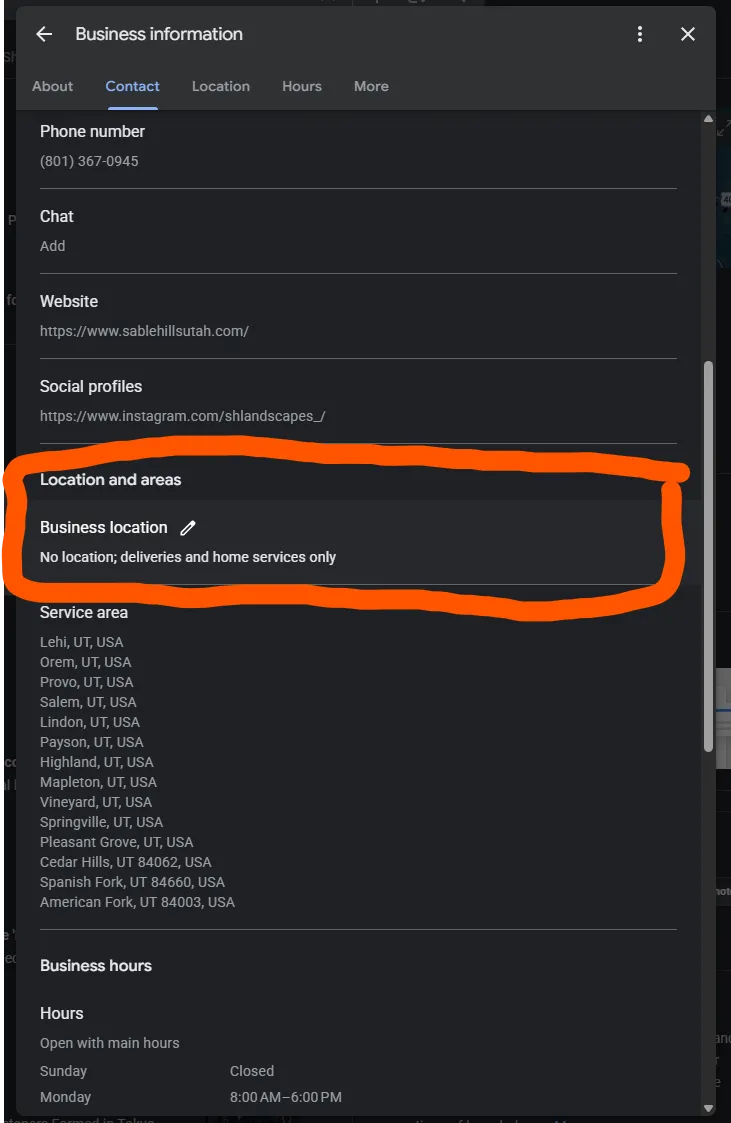
That last step is where most contractors trip up. If the address you enter doesn’t match what your state has on file, Google’s verification system flags it and either rejects the change or pushes you into a re-verification loop.
We’ve seen contractors get stuck on this for weeks. The fix is always the same: copy the address character-for-character from your state’s business records, not from your driver’s license or your mail.
About 60 to 70 percent of the time, Google will switch the setting instantly. No video, no postcard, no re-verification. This is especially common on profiles that have been around for a while with consistent activity. The fencing company we mentioned above? Switched in about ten minutes.
The other 30 to 40 percent of the time, Google will ask for a verification video. They’re looking for proof you operate from the address you listed, usually a walk-around of the property, your business signage, or some visual cue that ties the location to the company. The tree care client in Carnation took two or three attempts to get the verification video approved. Total elapsed time: under a week.
If you’ve never managed a Google Business Profile before, the interface can be confusing the first time through. We walk every client through this process during our free Google audit calls. It’s usually the first lever we pull for new contractors.
When you should not switch
This change is the right move for almost every contractor we’ve ever worked with. There are two edge cases where we hold off:
You’re a multi-location business. If you run separate crews out of separate physical locations, each location should have its own profile pointing to its own address. Don’t try to consolidate.
You’ve been hit with a Google penalty in the past 90 days. If Google has recently suspended or warned your profile, making structural changes can trigger another review. Wait for the dust to settle, fix the underlying issue, and then make the change.
That’s it. For everyone else, we’ve yet to find a case where staying as a service area business produced better rankings than switching to a location-based profile. The data is too consistent.
What to do this week
If you take one thing away from this, it should be this: check what type of profile you have right now. Most contractors don’t know. Google your business name, look at the map. If there’s no pin, you’ve found your bottleneck.
From there:
- Pull a Local Falcon scan on yourself, or book a free audit and we’ll run one for you.
- If you’re a service area business, set aside fifteen minutes to switch your profile to a location-based listing using your state-registered address.
- If you’re already a physical address profile and still not ranking, the issue is something else, usually reviews, profile completeness, or website authority. Our SEO services page covers what we focus on for contractors in that situation.
The contractors winning the map pack right now are not the ones with the best work. They’re the ones whose profiles give Google a fixed point on a map and enough trust to rank them. That’s almost always cheaper to fix than you’d guess.
FAQs
Will switching to a physical address erase my reviews? No. Reviews are tied to the profile, not the location setting. Switching the type leaves every review intact.
Do I need a separate business license for my home address? Not in most cases. If your business is already registered with the state at your home address, you’re set. If your LLC is registered to a different address, that’s the one to use on the profile.
Can I list a P.O. Box? No. Google specifically rejects P.O. Boxes, virtual offices, and coworking spaces for Business Profile addresses. It has to be a real physical location you operate from.
How long does it take to see ranking changes after switching? Most of the contractors we’ve worked with see meaningful movement within 30 days. The Carnation tree care client went from rank 201 to rank 3 in exactly one month. Other clients have seen movement in a week. It depends on how competitive your market is and how many reviews you have.
Should my service area still be set after I add a physical address? Yes. You can run both: a physical address AND a defined service area listing the cities you cover. This is the ideal configuration for most contractors. The physical address gives Google a ranking anchor; the service area tells homeowners where you’ll travel.
Keep reading