How to Fix a Suspended Google Business Profile Fast
Got the dreaded suspension email from Google? Here's exactly how to fix a suspended Google Business Profile, appeal it the right way, and get reinstated.

Table of contents
- What “suspended” actually means
- Step 1: Use Google’s Business Profile appeals tool
- Step 2: If the appeal comes back suspended, request reinstatement
- The documents that actually get profiles reinstated
- How long reinstatement takes, and what to do while you wait
- How to keep it from happening again
- FAQs
- What to do today
You went to verify your Google Business Profile, did everything Google asked, and instead of getting verified you got an email saying your profile has been suspended. No clear reason. No real explanation. Just a vague line about a policy violation and a button that may or may not work.
If that’s you, take a breath. You’re not alone, and this is fixable.
We’ve worked with over 50 home service contractors at this point, and probably half of them have hit a verification or suspension issue on Google at some point. Pest control, tree care, fencing, roofing, plumbing, it doesn’t matter the trade. Google’s automated system flags profiles constantly, and it almost never tells you why in plain English. The good news: knowing how to fix a suspended Google Business Profile is mostly about following the right steps in the right order. Below is the exact process we walk our clients through, plus the one thing that decides whether you get reinstated or stay stuck.
If you’d rather we just look at it for you, you can book a free Google audit and we’ll tell you where your profile stands.
What “suspended” actually means
When Google suspends your profile, the listing either disappears from search and Maps or loses its verified status. You usually find out through an email like this one.
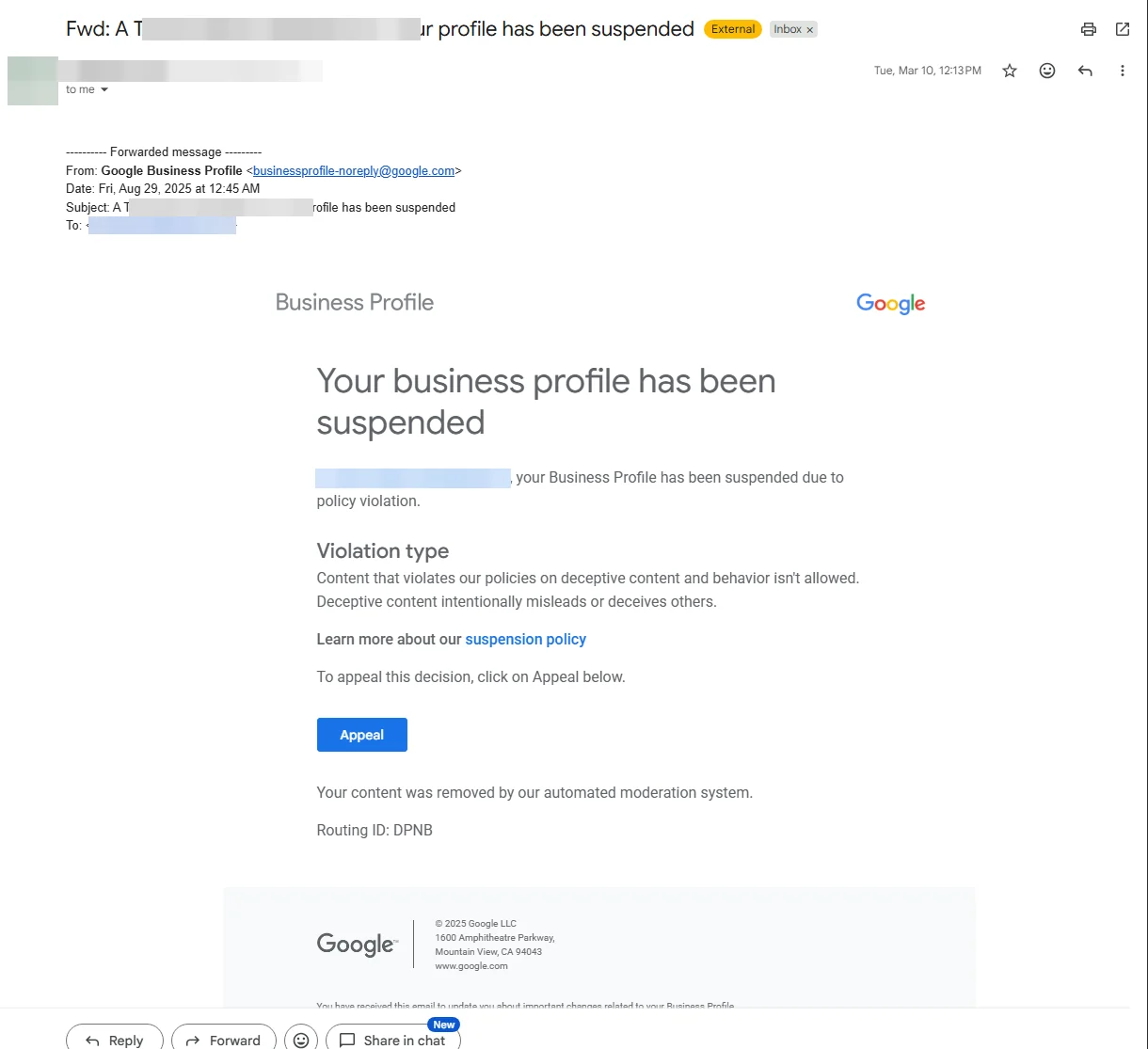
Notice what it does and doesn’t say. It tells you there’s a “policy violation,” names a broad category like deceptive content, and points you to an Appeal button. What it doesn’t do is tell you the specific thing on your profile that triggered it. That’s the part that drives owners crazy, and it’s why so many people assume their profile is gone for good.
It usually isn’t. A suspension is not a permanent ban. In most cases it’s a flag from Google’s automated moderation system that needs a human to review and reverse. Your reviews, your photos, and your history are still attached to the profile. You just need to get the listing reinstated.
The most common triggers we see on contractor profiles:
- An address that doesn’t match what your state business registration has on file
- Editing key info (name, address, phone) too quickly or too often
- A business name stuffed with keywords instead of your real registered name
- Running the profile from a virtual office, P.O. Box, or coworking space
- Past activity Google’s system reads as a duplicate listing
If any of those sound familiar, that’s likely your starting point. Google publishes the full list in its guidelines for representing your business, and it’s worth a read before you appeal.
Step 1: Use Google’s Business Profile appeals tool
Before you touch anything, two ground rules.
Do not create a new profile for the same business. This is the single biggest mistake we see. When owners panic, they spin up a fresh listing to get back online. Google’s system reads that as a duplicate, links it to the suspended one, and now you have two flagged profiles instead of one. Google says this directly in its help docs on fixing suspended profiles: don’t make a new profile while an appeal is in progress.
Do not submit the same appeal over and over. Firing off five appeals for the same issue doesn’t speed anything up. It can slow the review down or get the requests bundled and ignored. Submit one clean appeal, then wait.
With that out of the way, your first move is the official appeals tool. You don’t need a secret link. You can literally search “Google Business Profile appeals tool” and it comes right up, or start from Google’s appeal Business Profile restrictions page and hit “Submit an appeal.”
When you open it, Google confirms which account you’re signed in with, then walks you through the appeal.
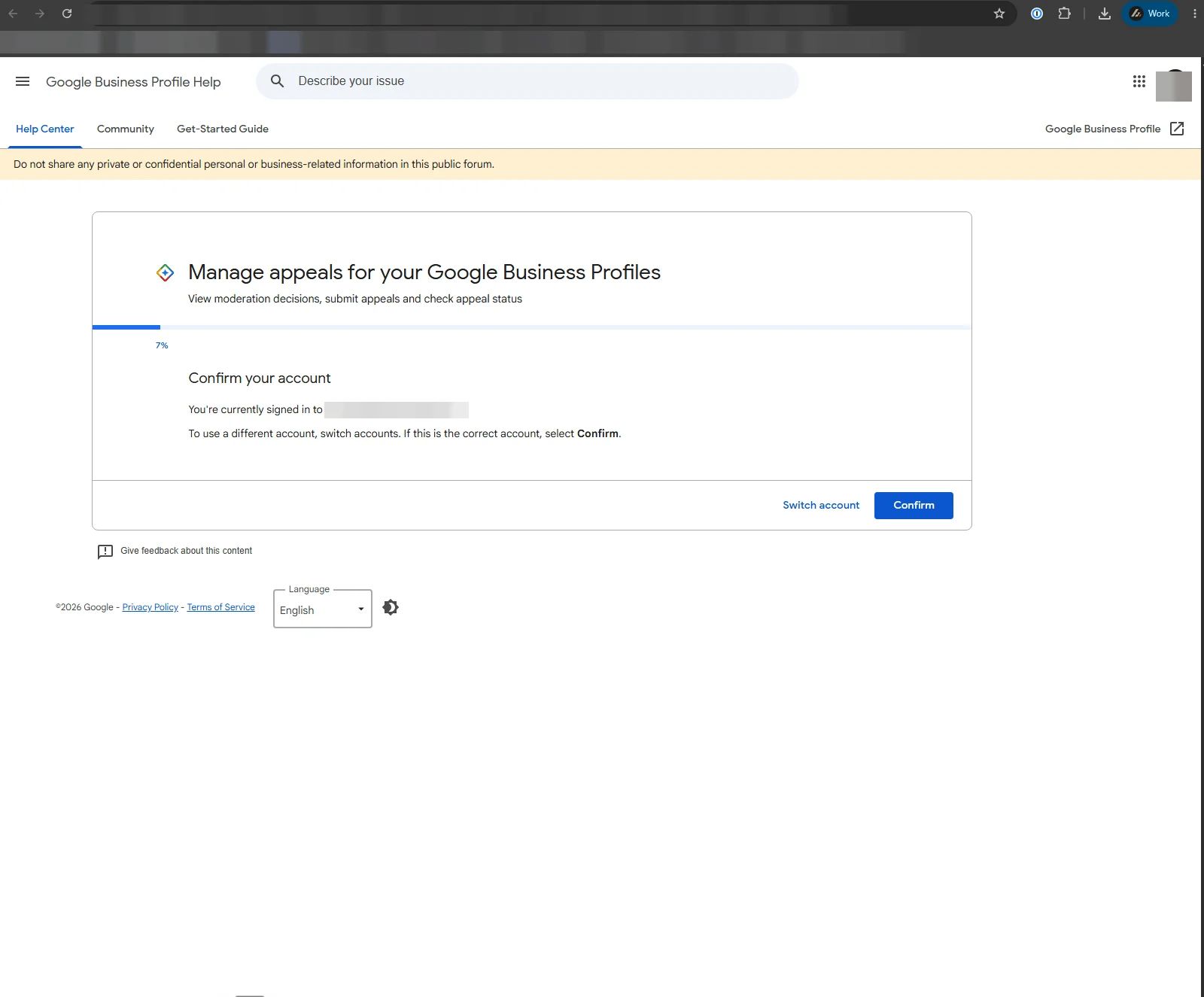
Make sure you’re signed in with the account that actually owns or manages the profile. If you appeal from the wrong Google account, the tool won’t see your suspended listing and you’ll spin your wheels.
A few things that make an appeal land:
- Tell the truth, plainly. State that you’re a real, operating business and that the listing represents a legitimate company. Don’t argue, don’t get clever.
- Match your details to your paperwork. The name and address you reference should match your state registration exactly. Same spelling, same suite numbers, same abbreviations.
- Have your evidence ready before you start, so you’re not scrambling mid-form. More on that in a second.
Appeals can take up to five business days for Google to review. Sometimes it’s faster. Resist the urge to poke it every day.
Step 2: If the appeal comes back suspended, request reinstatement
Sometimes you appeal and it works. Sometimes the automated system kicks it back and the profile is still suspended. This is where most contractors give up. Don’t.
If the appeals tool doesn’t reinstate you, the next step is to go through the Google Business Profile Help Center and submit a request to a human, asking to have your profile reinstated. Google routes appeals differently depending on the type of restriction, and the Help Center is where you find the right contact path for your situation.
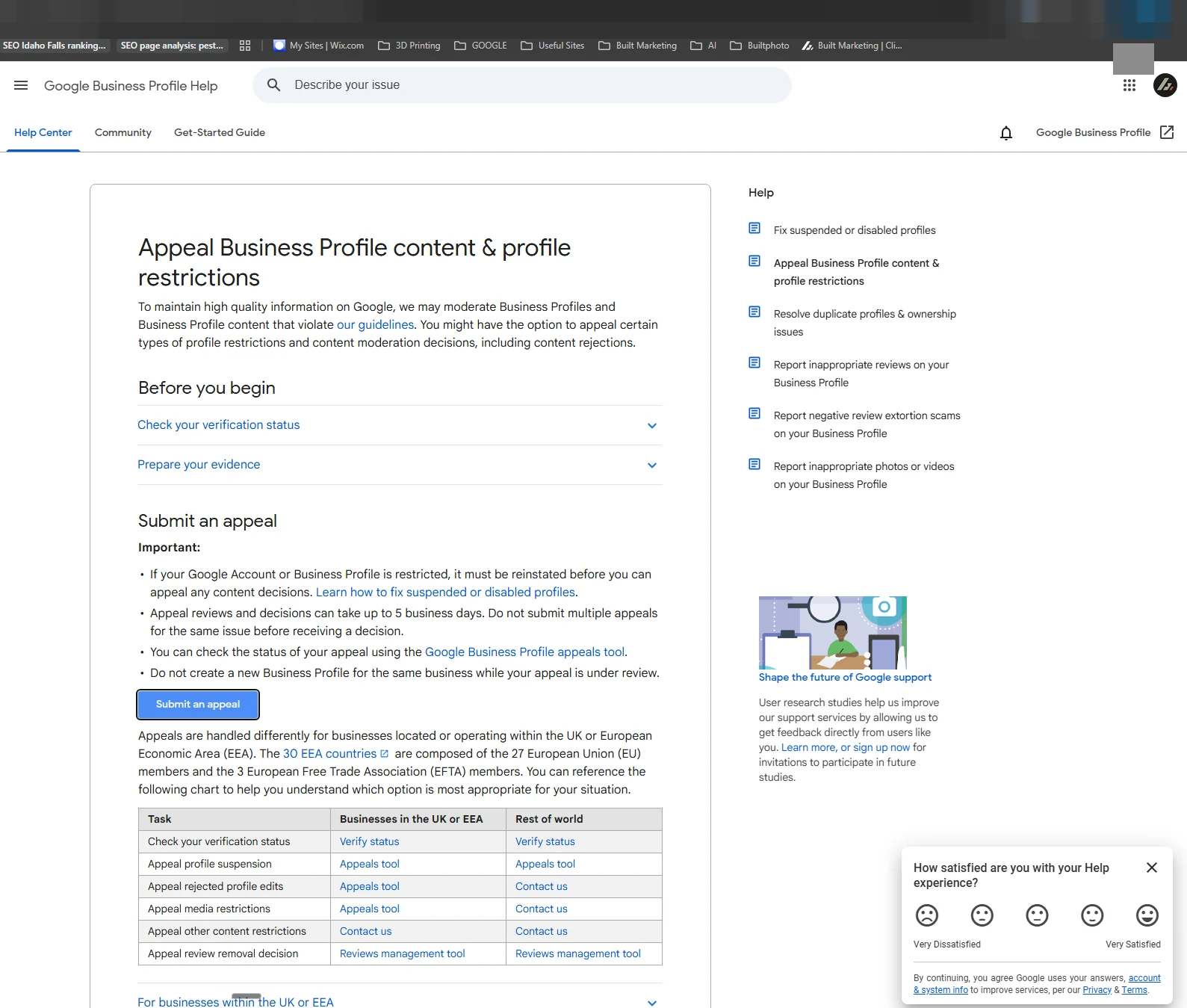
When you get to this stage, your whole job is to remove any doubt that you’re a real business operating from a real place. That comes down to documentation.
The documents that actually get profiles reinstated
This is the part that decides everything. Google’s reviewer is trying to answer one question: is this a legitimate business at the location it claims? Your goal is to make that a yes in about ten seconds of looking.
Include as many official business documents as you reasonably can. The strongest ones we’ve seen work:
- State business registration or LLC paperwork showing your business name and address
- A business license or trade license for your area
- A utility bill in the business name at the address you’re listing
- Insurance or bonding documents for the business
- A photo of your signage, branded vehicle, or storefront that ties the company to the location
- A lease agreement if you operate from a commercial space
You don’t need every one of these. You need enough that, taken together, they prove the business is real and tied to the address. The single most common reason a contractor’s appeal fails is a mismatch between the address on the profile and the address on the paperwork. Before you submit, line them up side by side and make them identical.
If your business runs out of your home, that’s fine. List the address that’s on your state registration. We covered why a real physical address matters so much for ranking in our breakdown of service area vs physical location profiles, and the same logic helps you here: a fixed, verifiable address gives Google the certainty it’s looking for.
How long reinstatement takes, and what to do while you wait
Plan on up to five business days for a decision after you submit, though it can run longer if it goes to a manual reviewer. While you wait:
- Don’t submit duplicate appeals. One request per issue.
- Don’t create a second profile. Same rule as before.
- Do keep your evidence handy in case a reviewer asks for more.
- Do keep running your business through your website, ads, and reviews so leads don’t dry up while the profile is offline.
This is also a good moment to make sure the rest of your online presence is pulling its weight. If a suspended profile can knock out a big chunk of your calls overnight, your map listing was probably carrying too much of the load alone. A conversion-focused contractor website and a steady review flow keep the phone ringing even when Google is being Google. That, paired with our local SEO services for contractors, is how we keep clients from being at the mercy of one listing. You can see the kind of ranking turnarounds that come out of it on our results page.
How to keep it from happening again
Once you’re back online, a few habits keep you off Google’s radar:
- Use your real, registered business name. No keyword stuffing like “Boise Pest Control Exterminator Co.” Use the name on your paperwork.
- Match every detail to your state records. Name, address, and phone should be identical across your profile, your website, and your registration.
- Don’t edit core info constantly. Set your name, address, and phone correctly once, then leave them alone. Frequent changes look suspicious to the system.
- Keep one profile per location. No duplicates. If you have stale old listings floating around, get them removed properly.
- Stay inside the guidelines. Skim Google’s guidelines for representing your business once a year so a policy change doesn’t catch you out.
Do those, and suspensions become a rare annoyance instead of a recurring fire.
FAQs
Why was my Google Business Profile suspended with no reason given? Google’s automated system flags profiles but almost never names the specific trigger. The usual culprits are an address that doesn’t match your state registration, a keyword-stuffed business name, frequent edits to core info, or a duplicate listing. Start by checking those against your actual paperwork.
Will I lose my reviews if my profile is suspended? No. Your reviews, photos, and profile history stay attached to the listing. They come back when the profile is reinstated. A suspension hides or unverifies the profile, it doesn’t wipe it. If you’ve noticed reviews disappearing on their own, that’s a separate issue with its own fix: here’s why Google deletes real reviews and how to get them back.
How long does it take to reinstate a suspended Google Business Profile? Usually up to five business days after you submit an appeal, sometimes faster, sometimes longer if a human reviewer gets involved. Submitting multiple appeals for the same issue does not speed it up and can slow it down.
Should I just make a new profile instead of appealing? No. Creating a new listing for the same business while a suspension or appeal is active gets read as a duplicate and usually makes things worse. Appeal the existing profile and wait it out.
What’s the most important thing in an appeal? Documentation that proves you’re a real business at the address you claim, with every detail matching your state records exactly. Address mismatches are the number one reason appeals fail.
Can you handle the appeal for me? Often, yes. We deal with verification and suspension issues for contractors regularly. The fastest way to start is to book a call and we’ll look at your specific situation.
What to do today
If your profile is suspended right now, here’s your order of operations. First, figure out the likely trigger by comparing your profile details to your state registration. Second, open the appeals tool and submit one clean appeal with your real business info. Third, if it kicks back, go through the Help Center and request reinstatement with your documents attached, address matching to the letter.
Then wait, without making a second profile or a second appeal.
A suspended profile feels like an emergency, and when it’s your main source of leads, it kind of is. But it’s a fixable one, and almost every contractor we’ve helped through it has come out the other side reinstated. If you want a second set of eyes before you appeal, see where your profile stands with a free audit and we’ll point you straight at the fix.
Keep reading